
From a garbage recommendation algorithm, and a flood of AI slop, mainstream video platforms like YouTube and TikTok never cease to amaze me with their incompetence. YouTube was the same platform that defamed me as a terrorist over an old YTP, without citing it’s sources, because it’s moderation was such dog crap. I then proceeded to take all my videos down, and tell them to GFY. Their email also claimed they still wanted me on YouTube, but clearly their actions speak louder than their baseless words.
A recent example is when a prominent critic of video game monetization got some of their videos removed for ‘promoting gambling’, despite said videos being critical of gambling practices in video games, both the CS-GO lotto skin gambling controversy, and the predatory lootbox/gacha crap. (replace “poketube.fun” with another YouTube frontend (or with “youtube.com” if you’re brave) if the link doesn’t work. I’m trying to protect the readers here.)
An older (and more documented) example is when their stupid AI moderation flagged robot combat videos as ‘animal cruelty’. This made the news multiple times, and that’s just a few of the many articles on this topic.
This kind of shitty content moderation has even marked it’s effects on human language. People are genuinely starting to use the phrases ‘unalive’ and ‘PDF file’ in serious contexts now. This ‘algospeak‘ phenomenon is a real thing, and there has already been a few books written on this subject.
This ‘algospeak’ thing won’t work forever. The bots may very well flag the workarounds, and make it even harder to discuss serious topics.
We know the advertisements aren’t held to the same standards. There are multiple examples of crappy YouTube ads uploaded to Reddit alone. Some have even been reuploaded as YouTube compilations, including the many ‘play this game, earn real money’ scams.
This is all the while the platform is pushing more invasive advertising shenanigans, including overlay ads that can not be dismissed. Imagine if it was a scam ad, and the video uploader has to answer for it being ‘part of the video’?
Even if you block the ads as many do nowadays, it’s still a pain in the rear end. The platform pushed ‘shorts’ into itself to compete with TikTok, and somehow became even worse than TikTok in many respects, especially with regards to content quality. Just type in “story sad ai kitten car accident”, and scroll down very slowly, and see what kind of diabolical shit shows up.
Trigger warning for the below image: cats in horrible situations.
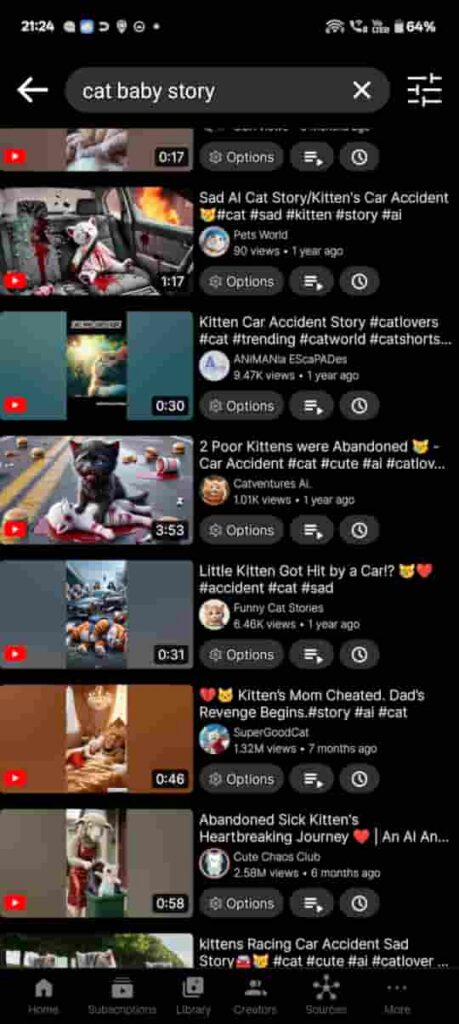
A search for “story sad ai kitten car accident”, using Grayjay, search results filtered to YouTube only.
Let this be ‘Exhibit A’ in the case for DO NOT LET YOUR CHILDREN USE THIS WEBSITE!
That’s just the tip of the ice berg. There have also been examples of pregnant cats having their stomachs punched in, or worse. This is worse than Elsagate.
This is all in addition to the usual social media poison existing in the platform, including it’s habit of drowning the device’s notification feed with recommendations that distract from the important stuff, like my important emails about bills to be paid, and the like.
What do we use instead?
For end users who want to watch videos, use things like Grayjay and other alternative frontends instead, where possible. These will make the most of the current monopolised situation where the vast majority of video content is on a single website, while cleaning up all the invasive stuff, like ads and trackers. Grayjay is a good example, as it has the additional functionality of aggregating multiple platforms other than YouTube, and has it’s own account system that can help content creators combine multiple accounts, useful for those who use other platforms as backups.
As for those who create videos, heed the advice below.
While it is certainly possible to use a competing platform, my idea is to forego social media entirely, and go straight to hosting the video file itself.
Our requirements are simple:
- We don’t care about feedback or metrics. Feedback can happen on another platforms, i.e. by embedding the video into a WordPress article as an external embed, and that’s all that matters to us.
- We don’t care about people downloading the file. That just means there’s less bandwidth costs for us to pay for once they’ve downloaded it. Watermarks can be added if content authenticity is a concern for the video creator, and sponsorships exist for the rest. Copyright laws may kick in if significant unauthorised use is made, at the content creator’s discretion.
- The videos are going to be downloaded anyway, with things like yt-dlp, or the likes of my patent-exempt Cardboard Box Technique, so DRM is going to be practically useless for this. There’s no point in stopping them. The most you can do is to target unauthorised commercial use, and libelous misrepresentation of your content. Watermarking may help with proving those in court.
- We don’t care about advertisements. Advertising doesn’t guarantee financial compensation (as YouTube’s ‘demonetization’ incidents can account for).
- Sponsorships baked into the video content itself may be more sustainable, but sustainability of that method also isn’t guaranteed. It’s still better than the advertising landscape of the current internet, however.
- Other funding opportunities, like donations and Patreon, may also help out a little, especially if one’s content remains popular enough.
- We don’t care about financial compensation for the videos.
- While paywalling the videos is certainly possible with the web server method, this would not prevent someone from distributing the video file once they’ve downloaded it.
Our methods include the following:
- Web server (may require port forwarding) (content may be paywalled via login if necessary)
- Cloud object storage solutions. i.e. Amazon’s S3, and the like. Many providers exist for this. They are often used as CDNs.
- Darknet solutions. i.e. Tor and I2P. (great for privacy, and restrictive internet connections that prohibit port forwarding, i.e. CG-NAT) (content may be paywalled via login if necessary)
- Decentralised solution using IPFS (great for limited bandwidth, as IPFS functions as it’s own CDN. It can also bypass CG-NAT limitations)
The pros and cons of each method vary.
First 2 methods are guaranteed to work on all modern web browsers.
Method 3 will require client software to be installed. Either a local software daemon combined with a browser extension (less secure), or a specialised web browser (most secure), depending on one’s threat model regarding anonymity.
method 4 uses public gateway infrastructure to serve web browsers, but will otherwise take advantage of local software if available.
The subject of our experiment
I am going to attempt to host the recorded video of one of my cardboard box video capture experiments using these various techniques. This is from MK2 of my ‘Schrödinger’s Box’ experiment, the one with the microphone in it. I will make a follow up article on that when I’ve completed that round of video capture experiments.
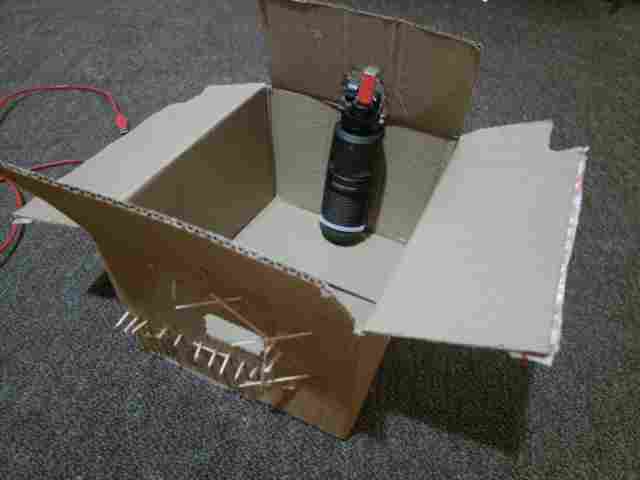
This is essentially video game footage recorded in a cardboard box, with a strategically placed microphone in the back, behind the handheld game console. I might as well have been drunk when I played it this time, but I don’t drink, nor do I play World of Warcraft.
- Filename: Mk2-WORLD_OF_WARCRAFT.mp4
- Filesize: 6730200KB (about 6.5GB)
- Resolution: 1920×1080
- Framerate: 30fps
- Bitrate: 128kbps + 19951kbps for audio and video respectively
- You might want a good internet connection for streaming this one.
This video could be re-encoded to a lower bit rate and/or lower resolution in order to decrease hosting costs, but I don’t have time to do that on my potato computer. I’d take too long.
Also worthy of note: The video game in question IS NOT World of Warcraft. It’s actually Hello Kitty Island Adventure. The name of the file is based on a South Park episode about World of Warcraft that predicted said Hello Kitty game’s existence.
There is long-standing precedent on the Internet that video game footage should be safe to use, legally speaking, as long as it’s being played by the person in question. Besides, game developers often use this kind of thing as a free marketing opportunity, some even paying for online streamers to play their games. If you like the game, give it a go for yourself.
Method 1: Web Server
Theoretically, all that’s needed is a web server directory with sufficient storage, and a server with sufficient bandwidth. I happen to have both at my disposal.
By simply placing the file in the Nginx directory with the correct permissions, will make the file publicly available, based on the rules set in the relevant /etc/nginx/sites-enabled/* configuration file. Such configuration file can be changed to require authentication for access to said file, allowing for a basic paywall if desired.
This file will take a significant portion of the disk space in the VPS server I’m using, so it might not be up there forever. I might delete it later to make space for other things, or if bandwidth costs exceed my expectations somehow.
This VPS is extremely close to the east Australian internet backbone. We are talking 0.55ms ping to/from Google’s servers here. This is ideal, since New Zealand’s internet exchanges are well linked to Australia’s ones. About 45ms ping between me and the server I’m using.
The VPS does cost money though, but it does have a couple of terabytes of egress traffic included before additional costs can be incurred. Good for hundreds of streams.
File link: https://faba.icu/284fb336-be38-4946-81e6-a42f618835d6/Mk2-WORLD_OF_WARCRAFT.mp4
After testing it, it seems quite performant. I can scroll through the video without issue. I can even embed it into this WordPress article, but I didn’t do that for now.
Pros and cons of this method:
- Your server, your rules. As long as you aren’t hosting anything particularly objectionable, the server will remain untouched as long as it’s paid for.
- Any copyright disputes will be directed at you. This may be a blessing or a curse depending on the context, but it does prevent most of the shady abuse that YouTube’s copyright system is known for. You might want to put a contact email on the main page of your site for legal stuff, so the provider doesn’t get complaints about it. Contact a lawyer if this is of any particular concern for the type of content you are hosting.
- Performance is limited by the internet connection used for the server. For datacenter stuff, like a VPS or a colocated server, this is usually very close to the internet backbone. For home internet, this will vary based on latency, and bandwidth. A good fiber connection on a competent provider is recommended, although things like coaxial cable, 5G, or Starlink may also work if one can get a static IP through them, or by securing a VPN to a static IP.
- Storage limitations. Each video requires hard drive space, and that may come at a premium in some cases. i.e. a cheap VPS may only have 25GB of total storage.
- Performance may also be limited by the server itself. Use potato hardware, expect potato results. This is why I used a VPS for this, as the underlying server hardware is usually pretty good, even on a cheap VPS.
- This method doesn’t have the robustness that a CDN will offer, as it’s served from a single server. This is a single point of congestion, and a single point of failure. One might remedy this by tunneling their traffic through something like Cloudflare, who can do the CDN stuff on behalf of the server.
- Paywalling will be possible, by using login and password on the web server. This won’t actually prevent anyone from downloading, and distributing the content once they have gained access to it, however.
Method 2: Cloud object storage
This method is often relegated to the idea of cloud computing. The idea is similar to that of a VPS, but in this instance, very minimal compute resources are involved.
A simple explanation of cloud object storage
With object storage, the idea is simple.
It’s the storage of objects. Files are the objects.
Objects are static, and unchanging. The act of editing the file would be to replace the object.
Objects are stored in buckets. Buckets may be public or private, but only authorised individuals or autonomous systems with the relevant API keys may modify the content of these buckets.
Objects may be cached over the entire storage network.
Private buckets allow for a convenient place for your backups, or a commonly accessed private data repository for instance.
Public buckets allow the objects to be dynamically distributed to where they need to go, essentially functioning as a content delivery network, where edge servers can cache some of the content on the edge of the network. i.e. close to an ISP’s servers, or even within them.
It is indeed that simple. Many large websites use this for offloading static data, like images and video content.
Some have even hosted entire websites this way, by placing them into object storage buckets, giving the provider the necessary SSL certificates for HTTPS hosting (sometimes they even do it themselves), and directing the DNS entries to the object storage server. This only makes sense for static websites without any interactive elements, that are only updated periodically. You need an actual web server for the interactive stuff.
Long story short, cloud object storage is perfect for this use case, as long as the one hosting the content doesn’t require anonymity. Many providers exists for this purpose. This will also cost money for both the data stored, and the egress traffic provided to end users, so it may be wise shop around for a good deal on this. It’s still a technology with massive applicability, and it’s use has been observed for over a decade now.
The process, or so I thought…
The process for me should be quite simple. Log in to Backblaze, create bucket, public, no encryption, and… it doesn’t support uploading files over 500mb through the GUI… LAME!
I’ll have to use rclone to do the rest with an API key then.
Add application key, name it, allow access to relevant bucket, create, and copy the details. Save in password manager for safe keeping.
Configure rclone, and add remote using key for Backblaze B2, add key info, done.
Now we test it: $ rclone ls bblze-vidhost-test-rclone:
Success. Now we upload the file:
$ rclone copy ./Mk2-WORLD_OF_WARCRAFT.mp4 bblze-vidhost-test-rclone:/
failed to create bucket: Invalid characters in bucketName
FUCK! RTFM!
Alright, I got it:
$ rclone copy ./Mk2-WORLD_OF_WARCRAFT.mp4 bblze-vidhost-test-rclone:vidhost-test/Mk2-WORLD-OF-WARCRAFT.mp4
Let it cook…
Done. Get the link…
$ rclone link bblze-vidhost-test-rclone:vidhost-test/Mk2-WORLD-OF-WARCRAFT.mp4
Done. Test the link…
"File with such name does not exist."
What the fuck?… Check the WebUI…
Bloody thing placed the file inside a subdirectory, but at least it works now…
Well, that was a royal pain in the Agapanthus…
After all that hassle, here it is:
https://f005.backblazeb2.com/file/vidhost-test/Mk2-WORLD-OF-WARCRAFT.mp4/Mk2-WORLD_OF_WARCRAFT.mp4
This wasn’t quite as performant, but that’s probably due to the datacenter(s) being in some other continent across the Pacific ocean (namely the one where that orange rock spider is currently president of), adding additional latency, but it works once the video starts playing. It’s only the scrolling through the video, and the loading time that the latency effects.’
A more appropriate CDN-focused object storage solution may overcome these latency concerns, but it’s actually not that bad all things considered.
As always, this video can be an external embed in a WordPress article, but I chose not to do that.
Pros and cons of this method:
- As long as you aren’t hosting anything particularly objectionable, the provider should leave the files untouched as long as the service is paid for.
- Any copyright disputes will be directed at you. This may be a blessing or a curse depending on the context, but it does prevent most of the shady abuse that YouTube’s copyright system is known for. You might want to put a contact email on the main page of your site for legal stuff, so the provider doesn’t get any direct complaints about it, giving you time to resolve the issue. Contact a lawyer if this is of any particular concern for the type of content you are hosting.
- Object storage solutions are usually extremely close to the internet backbone. Where on the internet, is another story. One should shop around for the appropriate object storage solution if low latency is desired, but it’s still usable for video nonetheless.
- Theoretically unlimited storage capacity, you just have to pay for what you use. This can be as cheap as $10 a month per terabyte, or even less if you score a good deal. You may get charged for egress traffic too, but that isn’t usually as much of an issue as the storage cost itself.
- This method will often have the robustness of a CDN, the degree of which will depend on the provider and it’s geographic location and/or geographic distribution, especially concerning geographically-bound storage tiers, and additional requirements, like lower latency if desired. Cheaper solutions often forego distributed CDN features, sometimes at the expense of latency.
- Paywalling content using this method, isn’t quite as straight forward. One might get away with encrypting the file and distributing keys from another server, but just like the many DRM schemes before it, it won’t actually prevent anyone from downloading, decrypting, and distributing the content once they have gained access to it. It may also increase bandwidth costs.
Method 3: Darknet Shenanigans
You may have heard of the likes of the Tor network, or the I2P network. Fantastic for punching through firewalls, bypassing internet censorship, hosting hidden websites from anywhere, and hidden e-commerce website that sell drugs. Don’t do the latter, they’ve probably laced it with Fentanyl, and that’s assuming that the darknet market itself isn’t a scam, as they often are.
Regardless of what’s on there, the technology behind these darknets is actually quite impressive. It also has the inherent safety net that is each hidden site being a random string of text. One actually has to actively be looking for the bad stuff in order to find it.
We can use this to our advantage. If we want to host a file, but we can’t puncture ports 80 and 443 through our firewall, and don’t have access to an external server, we don’t have many options, but things like Tor and I2P offer a solution to that.
We do have to disable HTTP redirection to HTTPS, as this will effect the functionality of this. These darknets provide their own encryption anyway. HTTPS over the regular internet will still be functional, it just won’t be enforced.
Tor was easy to get working, but the performance was garbage. No surprises there. A lower video quality may help things a bit. I’ll use the VPS CPU to convert the video to 480p with a moderately high CRF instead. I’ll leave the audio at 128kbps.
ffmpeg -i Mk2-WORLD_OF_WARCRAFT.mp4 -vf scale=854:480 -c:v libx264 -crf 32 -preset fast -c:a copy Mk2-WORLD_OF_WARCRAFT.480p.mp4
This may take about an hour, and the video quality will certainly suffer for it, but it should fix the bandwidth issue.
and it works. It takes a while to start, but that’s Tor for you. Other darknets exist, like I2P. I2P differs from Tor in that it doesn’t outproxy to the internet. I2P is darknet-only, so it may be more specialised for this purpose.
I2P is also more flexible. One can modify the tunnel length to configure the trade-off between anonymity and performance. I will configure it with a tunnel length of 1 for both inbound and outbound, as I don’t care about the anonymity right now. I will also configure it for high bandwidth, yet it still isn’t fast enough for the full 1080p video, so 480p it is…
It may take several seconds to load, and scrolling through the video isn’t very convenient to say the least, but it still works.
Pros and cons of this method:
- Anonymity is a core part of these networks, so this is a good backup method for those who are abused by frivolous legal threats, like many people living under oppressive regimes, or journalists who risk getting sued for doing their job. It may also be useful for those who want to share miscellaneous files of any kind regardless of legality in their geographic region. It’s a double ended sword, so each to their own I guess?
- Punctures through firewalls like a hot knife through butter. Can be hosted on any internet connection, without the need to worry about port forwarding.
- Performance isn’t particularly good, so videos will have to be hosted at reduced quality. Load times may also be high. this is due to the multiple hops such anonymising protocols take over the internet. Round-trip latency can often be measured to around a whole second.
- These networks require specialised software in order for access to be possible for the end-user. This won’t work for embedding the video, unless the website it’s embedded in is also on the relevant darknet.
- Paywalling will be possible, as with method 1. The content is hosted on a web erver, it’s just tunneled through an overlay network. This won’t actually prevent anyone from downloading, and distributing the content once they have gained access to it, however.
Method 4: IPFS
the InterPlanetary File System is an interesting piece of software engineering. A decentralised protocol that can host any file, and autonomously distribute it to wherever it is needed, while also distributing the source of the file around the internet in the process. The more the file is requested, the faster the file can be retrieved. IPFS functions as the ultimate CDN, at least when used on-device.
Just like the darknets in method 3, this does require specialised software, but unlike darknets, IPFS has the functionality of allowing for a hosted gateway to be used instead. Therefore, public gateways exist, like dweb.link. Cloudflare used to have a public IPFS gateway, but that has since been retired in favour of the official IPFS ones. Keep in mind that they do have an abuse policy, and also accept DMCA takedown requests for blacklisting resources from their public gateways, so one might want to encourage the use of a local on-device gateway instead where possible if DMCA abuse is a concern. This is as simple as installing IPFS on one’s device itself.
IPFS has actually been very popular for use as an immutable datastore for NFTs, where the NFT itself is a link to content, ant the content itself needs a futureproof and disaster-resistant method of storage. That doesn’t make NFTs themselves any less stupid of an idea however.
IPFS is content-addressed, so separate copies of the same file are treated and distributed as one file.
Okay, this is weird. After testing on the larger video file, the local gateway works, but public gateways don’t quite work as I expected. It appears that they don’t work well with large video files. Small file works, so small file it is then…
Hosting a file on IPFS is as easy as running:
$ ipfs add --nocopy /home/ipfs/www/faba/284fb336-be38-4946-81e6-a42f618835d6/Mk2-WORLD_OF_WARCRAFT.480p.mp4
important note: I used the experimental --nocopy flag to skip the datastore and save disk space on my VPS, which is at a premium right now. Otherwise, the process is the same.
I also symlinked the /var/www directory to the /home/ipfs directory to overcome the “cannot add filestore references outside ipfs root” error.
One may also wish to use IPNS using ipfs pin to make a link that references a file or directory whose contents may change over time, allowing for a web server directory to be updated, for example.
It spat out the following:
added QmURUKL7tH4HeDR8jzEJFYFTKXC7CrVGrAsr1k7VtyXAe8 Mk2-WORLD_OF_WARCRAFT.480p.mp4
“QmURUKL7tH4HeDR8jzEJFYFTKXC7CrVGrAsr1k7VtyXAe8
local node: http://127.0.0.1:8080/ipfs/QmURUKL7tH4HeDR8jzEJFYFTKXC7CrVGrAsr1k7VtyXAe8
This can be converted to base32, and used in the subdomain gateways:
$ sudo -u ipfs ipfs cid base32 QmURUKL7tH4HeDR8jzEJFYFTKXC7CrVGrAsr1k7VtyXAe8
bafybeic2mjdersgydnw5rjnakiwir2fklum5e564lcv2q3beapxxshvwxu
This can be used in a DNS subdomain link:
http://bafybeic2mjdersgydnw5rjnakiwir2fklum5e564lcv2q3beapxxshvwxu.ipfs.localhost:8080
Translated to public gateway link:
https://bafybeic2mjdersgydnw5rjnakiwir2fklum5e564lcv2q3beapxxshvwxu.ipfs.dweb.link/
Pros and cons of this method:
- While IPFS provides decentralisation and fault-tolerance, it doesn’t provide anonymity. It is still possible to track an IP address that hosts content through the IPFS network, although it’s a bit more convoluted due to the decentralised nature of IPFS, where downloaders automatically become uploaders, similar to what happens with bittorrent. IPNS will likely be traceable to it’s origin, however.
- In addition, public gateways may blacklist content from being accessed through them if they get a legal complaint. The act of using a local IPFS instance can be used instead to bypass this, however.
- Another easy bypass for this kind of blacklist would be to append an extra byte to the file, changing it’s hash in the process, thereby circumventing the blacklist. This means that this content blacklisting technique is yet another game of whack-a-mole. Hollywood entertainment companies must seem to love playing that game, huh?
- In addition, public gateways may blacklist content from being accessed through them if they get a legal complaint. The act of using a local IPFS instance can be used instead to bypass this, however.
- This method takes advantage of client-side software in the best case scenario, but will fall back to public gateways if this isn’t possible. The public gateway may prove to be a congestion point, and a point of failure.
- Public gateways may not work properly with large video files, for some reason. Local gateway will still work.
- Punctures through firewalls by design. No need to forward ports, although it is preferable if one could do so.
- Performance is moderate, or even good in the best case scenario. It depends on how common the file is within the IPFS network. Best case scenario may assume a device on the local network has the same file that it can provide over the local network, bypassing the internet connection entirely.
- Paywalling content using this method, will not be straight forward. One might get away with encrypting the file and distributing keys from a server, but just like the many DRM schemes before it, it won’t actually prevent anyone from downloading, decrypting, and distributing the content once they have gained access to it. It may also increase bandwidth, and eliminate many of the benefits of using IPFS.
What’s the most appropriate solution?
It will depend on the use case. For example:
- For a personal vlog, a video series, or a podcast: Use methods 1 or 2, either host from a server, or use a cloud object storage bucket. The former is easiest, while the latter provides the most flexibility.
- The files may then be embedded into a WordPress article without much effort. Just upload to cloud bucket, take the public link, and embed it into the article. Simple
- There may even be a WordPress plugin that will automate the object storage solution, or it could be a feature of WordPress itself, IDK, haven’t checked.
- One might also want a contact email on such website for dealing with legal stuff, so the hosting provider doesn’t have to deal with it first.
- For paywalling content behind a purchase or a subscription, use method #1. This will give the site administrator precise control over who can access what via a login system.
- Don’t bother with DRM, it’s a waste of carbon emissions when used on audio/video/text content. It’s also a crime against accessibility for those who need their viewing augmented for safety reasons (i.e. to reduce flashing light that can cause seizures in some people). Just admit that your content will be copied eventually. Just accept it already. Even a cardboard box can be a sufficient tool in DRM circumvention, let alone cracking the encryption itself with a good GPU cluster, or a future quantum computer.
- To mitigate the inevitability of this, one may provide a more convenient means to legal content access. Whether it be a better experience, or a cheap and convenient price, each step matters when competing with that whole“free, but you risk your computer contracting the kind of digital equivalent of syphilis that hacks into your bank account if you don’t know what you’re doing” type shit.
- Content watermarking techniques may be a countermeasure that can be deployed to mitigate unauthorised commercial use of content. This can prove a content’s origin for a copyright enforcement case if one is interested in taking that to court. This can sort out the main parasitic weeds of DVD bootleggers in the street markets for example.
- Experienced users who want free content, will get it regardless of what you do, and there is no point in spending thousands of dollars suing over damages that amount to less than 50 dollars. The most you can do is provide a more convenient legal option to those who care about supporting the content production process.
- Don’t bother with DRM, it’s a waste of carbon emissions when used on audio/video/text content. It’s also a crime against accessibility for those who need their viewing augmented for safety reasons (i.e. to reduce flashing light that can cause seizures in some people). Just admit that your content will be copied eventually. Just accept it already. Even a cardboard box can be a sufficient tool in DRM circumvention, let alone cracking the encryption itself with a good GPU cluster, or a future quantum computer.
- For those who are in oppressive scenarios, are wanted by criminals, are doing something considered extremely illegal (or are in close association with someone who is), or are otherwise a paranoid conspiracy theorist worrying about the glow-in-the-dark 3-letter-agency ninjas spying on you and turning your pet frog’s orchids gay, use method 3. This will provide the best privacy, in the expense of bandwidth capacity.
- One will have to limit the bitrate of the media file, as to actually make it playable over such networks. Stick to around 512kbps or lower.
- If you are doing this to distribute ‘cheese pizza’, ‘canned pringles’, or ‘club penguin’, then forget about it. The authorities already know who you are, where you live, and what you are doing. The world is sick and tired of rock spiders like you crawling around it. Go commit drop the soap.
- Same goes for terrorists. I saw what happened in Christchurch in 2019, you stupid pieces of canine fecal matter. Stop calling him a ‘hero’. We don’t need to be reminded of what he did. Go commit solitary confinement.
- If you are making an archive of old internet media, or are otherwise distributing a large dataset, method #4 might be worth looking into. Many organisations who are dedicated to media preservation use IPFS due to it’s incredible flexibility, and distributed nature. IPFS can even be run on computing clusters if necessary.
- If there are legal concerns over the content in question, one might look into using a good VPN. IPFS will work over those, regardless of port forwarding. This is because IPFS doesn’t guarantee privacy or anonymity on it’s own. Content can’t be deleted off of IPFS either, so keep that in mind also. I’d contact a lawyer if this content immutability becomes a serious concern in the future (i.e. the government classifies something you previously posted as illegal that was not when you originally posted it).
- If the legal concern is about ‘cheese pizza’, ‘crabby patties’, or ‘Caribbean Poultry’, then forget about it. The authorities already know who you are, where you live, and what you are doing. There is no saving rock spiders like you.
- Same goes for those terrorists who wish to harm people, and celebrate the act of their mates doing so. Again, Christchurch flashbacks and all that. You make me sick.
- If the legal concern is about ‘cheese pizza’, ‘crabby patties’, or ‘Caribbean Poultry’, then forget about it. The authorities already know who you are, where you live, and what you are doing. There is no saving rock spiders like you.
- Files may be encrypted before they are added to IPFS, but this may inhibit many of the benefits of using IPFS in the first place, namely concerning the content-addressed nature of IPFS. Encryption might still be useful for securely sharing files privately among a group of select individuals, however…
- If there are legal concerns over the content in question, one might look into using a good VPN. IPFS will work over those, regardless of port forwarding. This is because IPFS doesn’t guarantee privacy or anonymity on it’s own. Content can’t be deleted off of IPFS either, so keep that in mind also. I’d contact a lawyer if this content immutability becomes a serious concern in the future (i.e. the government classifies something you previously posted as illegal that was not when you originally posted it).
The conclusion?
There are plenty of alternative methods to hosting content that don’t rely on social media sites. They may not be as convenient or as cheap, but they are worth looking into.
The reason why these free services are such dog crap, is because they aren’t getting paid to host the content, and the platforms are starting to realise that advertising revenue isn’t guaranteed revenue. That means that it’s an active liability for them to host content without doing shady stuff, like:
- Tweaking their content moderation to remove more content (regardless of what it is), because most people are powerless to fight back.
- Selling personally identifying information of their users to the highest bidder.
- Forcing advertising into their services more aggressively, to the point of self-parody, potentially driving away users from using the platform as frequently(less egress bandwidth if less heavy users use the platform, thereby reducing costs)
- Lowering the bar for what content is acceptable for advertisements. The ad money is just too irresistable.(youtubers can’t say ‘shit’ or else they get their ads pulled, yet the ads often contain the cringiest horny bait shit ever witnessed by human kind. Oh, and all the Elon Musk crypto giveaway scams)
- Flooding users with useless push notifications by default, in attempt to psychologically hook them back into the app.
- Demonetising content, so they don’t have to pay the content creators (not that that was viable long-term anyway).
- Pushing for generative AI, to inflate their content portfolio, and drown out the metrics for paid content posters, so they don’t need to pay as much.
- Tweaking recommendation algorithms to push content that makes people more outraged. Statistics show that a more emotionally charged response is more likely to gather a user’s attention. Same thing that happens on TV news (it’s 90% bad news, because bad news gets the most of the views).
The best way to bypass this is to pay for your own platform, and bypass this unsustainable social media game entirely. It’s better for the brain.
There are alternative social media solutions, including the fediverse ones that are quite promising, but it’s good to sidestep this whole social media thing altogether, and tell those free-but-unsustainable services where to stick it.
If one finds it too hard to set up a website, and use cloud object storage, there are consultancy firms and service providers out there that can help do this stuff for you, it just might cost a little extra. One can even hire someone for the sole purpose of setting up and maintaining such a website.
Otherwise, an experienced individual can set up a perfectly usable website for about 20-30 bucks a month, and that’s for the costs of both the server, and the domain name included. More complex setups might cost more, especially if more storage space is needed.
One can re-encode the videos into lower bitrate and lower quality to save on hosting costs, and make the content easier to access for slower internet connections. Ask yourself if you really need to host expensive 4K videos.
Some may use AI to help them do this kind of thing, but I’d highly advise against blindly obtaining serious technical advice from something that repeatedly told people to kill themselves, and put glue on their pizzas. Generative AI technology is also quite unsustainable in a datacenter context, with the main concern being electricity usage. Most AI companies are actually losing money by deploying this stuff. Use AI at your own discretion, and at your own risk. I might make an article about self-hosting a local LLM on an old beheaded e-waste laptop, as that’s more sustainable than using a data center API in most cases.
Self-hosting video content is certainly possible. It isn’t quite as staight forward as uploading to a crack den social media site, nor is it as cheap and effortless, but it is certainly is more future proof than relying on a platform that keeps changing it’s own rules, and retroactively punishing people who uploaded content before the rules changed.